
You click a YouTube link.
Instead of the video, you see the grey screen:
“This video is unavailable.”
Quick Answer of your question: How to Watch Deleted YouTube Videos?
Deleted YouTube videos cannot be restored directly from YouTube.
However, you can often identify or locate archived copies by recovering the thumbnail, video metadata, or Video ID and searching trusted web archives and mirrors.
Table of Contents
The video is gone.
It may have been deleted by the creator, removed due to copyright, or taken down after a channel strike. Whatever the reason, the content feels lost forever.
Here is the honest truth — and most websites won’t tell you this:
If a video is deleted from YouTube’s servers, it cannot be restored or watched directly on YouTube.
Despite this, many articles still try to sell “YouTube video recovery software.” Data recovery tools scan your hard drive, not YouTube’s servers. If you never downloaded the video file, that software cannot recover it.
However, the internet rarely deletes everything completely.
While the video file may be gone, the metadata (thumbnail, title, description, video ID) often survives — and that information is the key to finding archived copies or re-uploads elsewhere.
We tested 15 commonly suggested methods.
Only 5 still work reliably in 2026.
This guide documents those verified methods.
Disclaimer: This guide focuses on metadata recovery and public web archives. It does not promote copyright infringement or unauthorized access to private content.
Method 1: The Digital Forensic Method (Reverse Image Search) — Most Effective
This is the highest-success strategy, especially for popular or viral videos.
Why this works
When a YouTube video is deleted, playback stops immediately.
But the thumbnail image is usually served from a separate image delivery system and often remains cached across the web.
That thumbnail becomes your forensic evidence.
People re-upload content constantly — often with different titles. Text search fails, but image search succeeds.
Step-by-step
Step 1: Copy the deleted video URL
Even if the video doesn’t load, keep the full link. You’ll need it.
Step 2: Extract the cached thumbnail
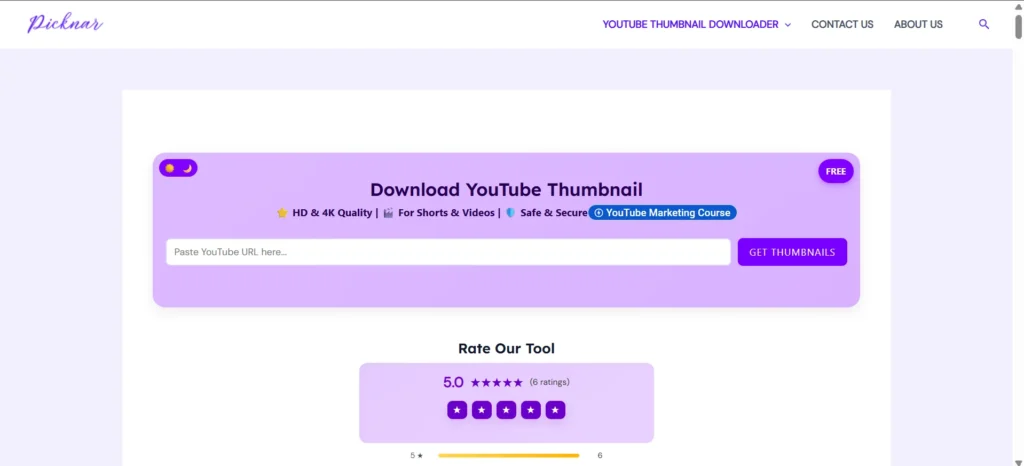
Paste the deleted URL into the Picknar YouTube Thumbnail Downloader.
Picknar is designed to retrieve historical thumbnail If available, increasing the chance of accessing the highest available resolution (including maxresdefault when available).
Why this matters:
Higher-resolution images produce better reverse image search matches.
Step 3: Save the image immediately
Download the highest quality version shown.
Step 4: Run a reverse image search
Upload the image to:
- Yandex Images (best for finding mirrors and international re-uploads)
- Google Lens (best for recent or mainstream content)
Result
You may find the same video re-uploaded on:
- Dailymotion
- Vimeo
- News sites
- Forums or blogs
Best for: Videos with moderate to high view counts.
Method 2: The Wayback Machine (Done Correctly)
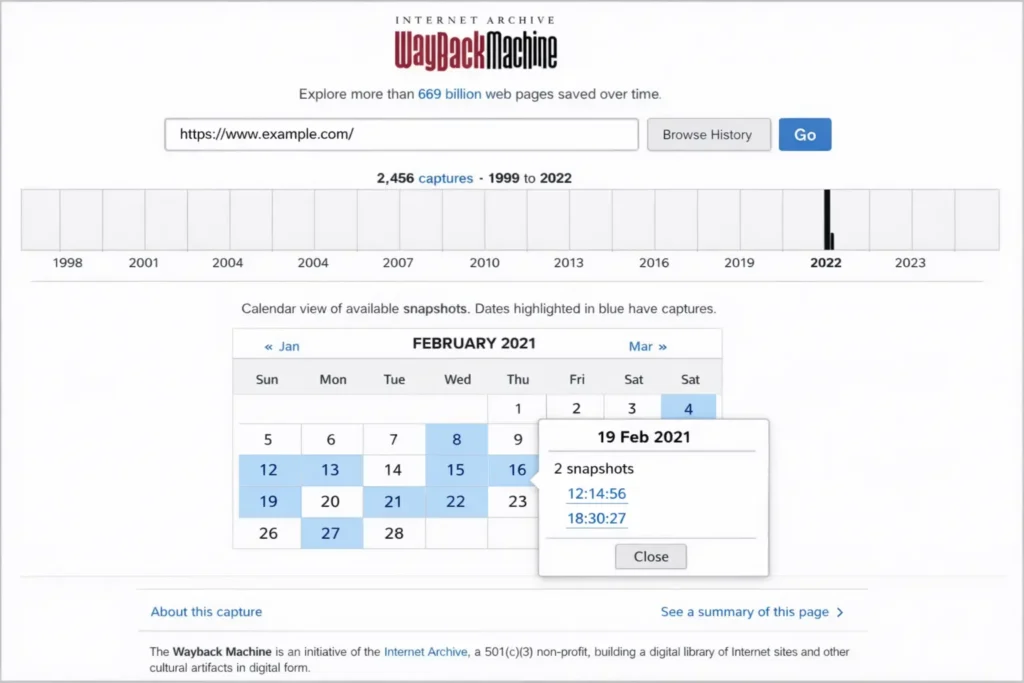
The Internet Archive (archive.org) stores snapshots of billions of web pages, including YouTube video pages.
How to use it properly
- Go to archive.org/web/
- Paste the deleted YouTube URL
- Check the calendar view
Important tip:
Do not click the most recent snapshot.
Choose a date before the video was deleted.
If the video doesn’t play
This is common — and not a failure.
Right-click the page → View Page Source
Search for:
- Video title
- Description
- Thumbnail URL
- Upload date
Even if playback fails, this metadata gives you exact search terms to find the video elsewhere.
Method 3: Alternative Video Archives (Often Overlooked)
Most guides stop at the Wayback Machine. That’s a mistake.
GhostArchive.org
- Specializes in archiving YouTube videos
- Often stores the actual video file
- Faster and more reliable for controversial or viral content
Coverage is smaller than Wayback, but success rate is higher when available.
Archive.today
- Best for recovering titles, descriptions, and embedded references
- Useful when videos were archived shortly before deletion
Method 4: Search by Video ID (URL Forensics)
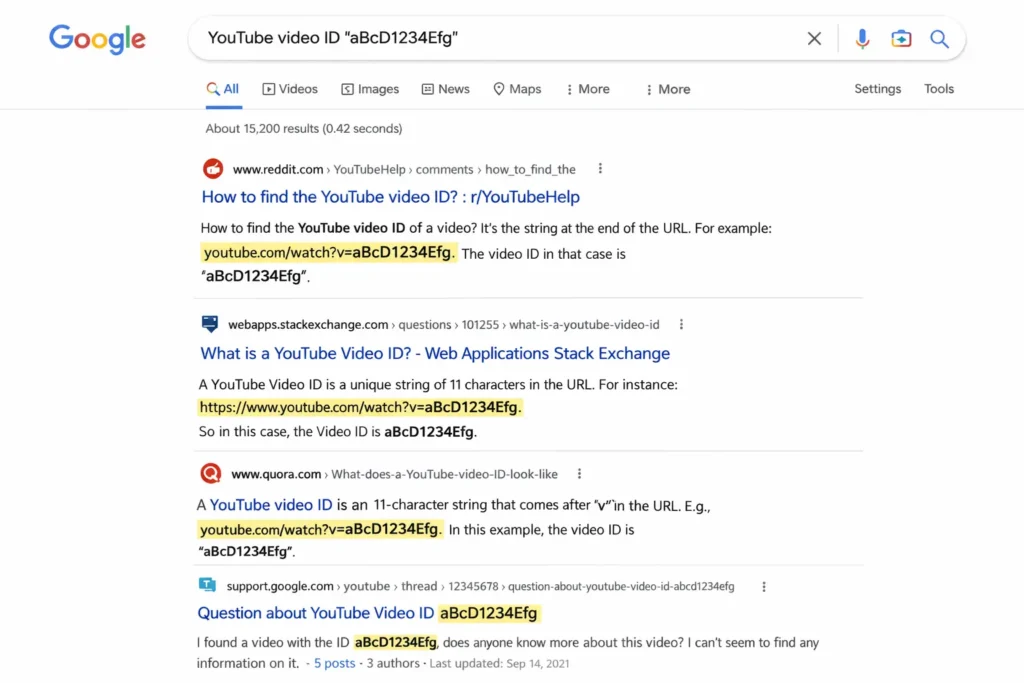
Every YouTube video has a unique 11-character Video ID.
Example:
https://www.youtube.com/watch?v=dQw4w9WgXcQ
Video ID =dQw4w9WgXcQ
How to use it
- Copy only the Video ID
- Paste it directly into DuckDuckGo or Google
- Do not include the word “YouTube”
Why this works
The Video ID acts as a permanent fingerprint.
It often appears in:
- Reddit discussions
- Forum posts
- News articles
- Archived embeds
These sources frequently reveal the original title, creator name, or links to mirrors.
Method 5: Recovering Metadata from Playlists
If a deleted video appeared inside a playlist, YouTube sometimes leaks cached metadata briefly.
How to try it
- Open the playlist on desktop
- Find the greyed-out “Deleted video”
- Right-click → Open in new tab
Sometimes, the browser tab briefly shows the original title before the error page loads.
If you catch it:
- Take a screenshot immediately
- Paste the URL into Picknar to secure the thumbnail and metadata
This method is timing-sensitive but useful for music playlists.
🛑 Methods That No Longer Work in 2026
Avoid these outdated techniques — they waste time and can cost money.
Google Cache
Google officially removed cached page access in 2024.
Any guide suggesting cache: is outdated.
URL Replacement Tricks
Changing youtube.com to yout.com, ssyoutube, or similar redirects no longer works reliably due to API restrictions.
Data Recovery Software
Programs like EaseUS or Wondershare cannot recover streaming videos. These tools are effective for recovering files you deleted from your own laptop. They cannot access YouTube’s cloud servers. Marketing them as a “YouTube Video Recovery” solution is technically incorrect for streaming content.
FAQ: Legal Safety and Viewing Deleted YouTube Videos.
Is it legal to watch archived deleted videos?
Accessing public web archives is legal for research and reference.
Downloading or redistributing copyrighted material without permission is not.
Why do YouTube videos get deleted?
Common reasons include:
1: Copyright strikes (DMCA)
2: Community guideline violations
3: Creator deletion
4: Legal takedown requests
Can I recover my own deleted channel videos?
You cannot restore them on YouTube, but you can:
1: Recover thumbnails and metadata
2: Locate mirrors or re-uploads
3: Rebuild your content archive
What about private videos?
Private videos still exist on YouTube’s servers but require authorization.
There is no ethical or legal way to access them without permission.
Final Thoughts
Most deleted YouTube videos are gone forever in their original location.
But the context often survives.
The most effective recovery strategy is forensic, not magical:
- Recover the thumbnail
- Extract metadata
- Search archives and mirrors
Avoid software promising impossible recoveries.
Focus on digital footprint tracing instead.
With the right approach — and tools like Picknar — you can often rediscover what you thought was lost.
How to Watch Deleted YouTube Videos: 5 Verified Methods (2026 Guide)
You click a YouTube link.Instead of the video, you see the grey screen: “This video…

Why MrBeast Just Secretly Changed His Entire Thumbnail Strategy
Stop what you’re doing and look closer at MrBeast’s channel. That famous thumbnail Strategy style…

How to Make a Perfect Thumbnail Copy (Instantly & Free)
Have you ever tried to make a thumbnail copy from a YouTube video, only to end up…

7 YouTube Thumbnail Mistakes That Are Killing Your Views (And How to Fix Them)
You’ve spent hours creating the perfect video. You’ve edited it, optimized the description, and you’re…

How to Make the Perfect YouTube Thumbnail (Complete Strategic Guide)
Quick Answer: What Makes a Thumbnail “Perfect”? A perfect YouTube thumbnail is not the most…